Miller Digital Elite Battery and Lens Replacement Guide
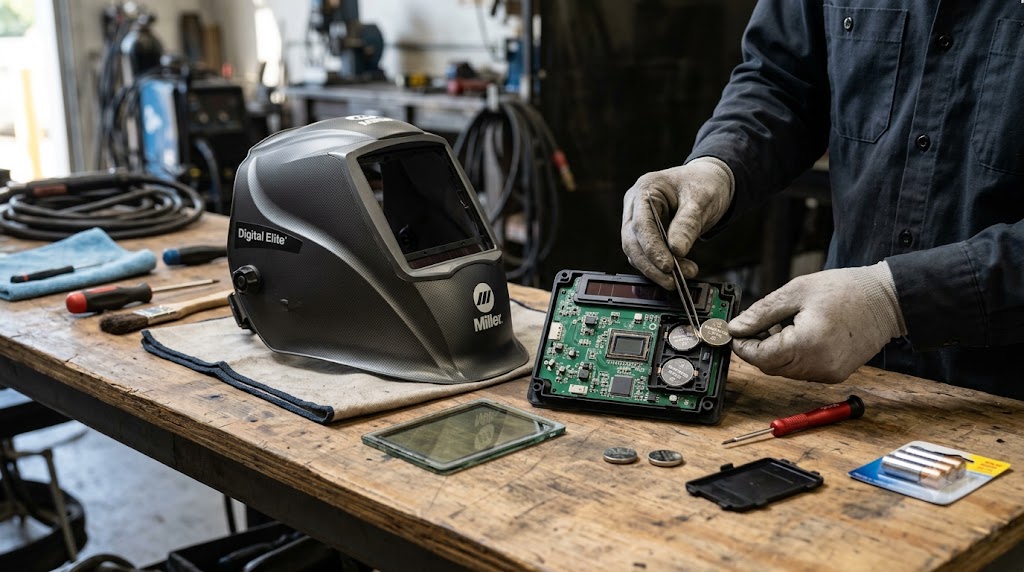
The Miller Digital Elite is one of the most widely used auto-darkening helmets in professional welding shops, and for good reason - it is reliable, well-built, and the lens optics are genuinely good. But like any electronic welding tool, it needs periodic consumable maintenance to keep performing the way it did on day one. This guide covers the two most common service tasks: replacing the batteries and replacing the cover lenses, with exact part numbers so you can order the right items the first time.
The Battery: What It Is and When to Replace It
The Miller Digital Elite uses two CR2450 3V lithium coin-cell batteries. Miller’s genuine replacement is part number 217043, sold individually. Most users buy them in a two-pack or five-pack since you replace both at the same time. The same CR2450 battery (217043) fits virtually all Miller auto-darkening helmets except the Classic and analog Pro-Hobby series.
Signs the battery needs replacement:
- The LCD display does not light up when you power the helmet on
- The lens takes longer than usual to darken, or darkens inconsistently
- The helmet powers off unexpectedly mid-weld
- The battery indicator on the display (if visible) shows low
- The helmet has been in storage for more than a year without use
CR2450 batteries have a shelf life of approximately 8 years unused, but active welding use discharges them faster depending on arc hours. A heavy-use professional welder may replace the batteries annually. A hobbyist might go two to three years between changes.
Genuine Miller part 217043 is available on Amazon and from welding supply distributors. Search for Miller Electric 217043 or CR2450 welding helmet battery. The genuine Miller-branded batteries are Panasonic cells and are recommended over generic alternatives, which can vary slightly in diameter and may not seat properly in the battery tray.
How to Replace the Batteries
The battery change procedure on the Digital Elite is straightforward but requires removing the lens assembly, which stops some first-timers.
- Remove the front cover lens holder by pressing the release tabs on the outer shell and tilting the lens frame forward.
- Remove the outer cover lens (216326) from the frame.
- Slide the ADF cartridge (the auto-darkening lens assembly) out of the helmet shell. It unclips from retention tabs on either side.
- On the back of the ADF cartridge, locate the battery tray - a small plastic housing, usually at the top of the cartridge near the solar panel.
- Use a coin or small flat screwdriver to rotate the battery tray cover counterclockwise and remove it.
- Remove both old CR2450 batteries. Note the orientation (positive side typically faces forward, away from the sensors).
- Install two fresh 217043 batteries in the correct orientation.
- Replace the battery tray cover, rotate clockwise to lock.
- Reinstall the ADF cartridge, outer cover lens, and front lens holder.
- Power on the helmet and verify the LCD display activates.
Miller has a step-by-step video on their website (millerwelds.com) that walks through this process visually if you prefer a visual reference.
The Cover Lenses: Outer and Inner
Cover lenses are sacrificial polycarbonate plates that protect the ADF cartridge from spatter, grinding debris, and scratches. They are consumables - when they become too scratched, pitted, or spatter-coated to see clearly, they get replaced rather than cleaned. Trying to polish deeply scratched cover lenses rarely restores clarity and is not worth the time.
Outer cover lens - part 216326 This is the lens on the outside of the helmet, facing the workpiece. It takes the most abuse. Miller sells this in a 5-pack, which makes sense because the outer lens typically needs replacement every few weeks to months of active use depending on process and spatter levels. MIG with short-circuit transfer generates more spatter than TIG, so MIG welders go through outer lenses faster.
The 216326 fits the Elite, Digital Elite, and Titanium series. If you have an older Miller Elite helmet, the same 216326 lens is your outer cover lens.
Inner cover lens - part 216327 This sits between the ADF cartridge and your face, protecting the lens from sweat, condensation, and the occasional dropped helmet. The inner lens is protected from spatter and typically lasts much longer than the outer lens - often six months to a year of daily use before needing replacement. Replace it when it shows significant scratching or fogging.
Recognizing when a cover lens needs replacement:
- Visible scratch patterns in your field of view
- Weld spatter pits that cannot be wiped clean
- A general haze or film that reduces arc visibility
- Yellowing or brown discoloration from heat
Do not weld without both cover lenses installed. Most Miller warranty terms are voided for ADF damage if the helmet is used without cover lenses properly in place.
Other Maintenance Parts
While you have the helmet apart for a battery change, it is a good time to check the other wear items.
Headgear - part 770246 The ratchet headgear on the Digital Elite takes daily abuse: sweat, being dropped, head adjustments in and out dozens of times per shift. The 770246 headgear fits virtually all Miller auto-darkening helmets including the XLix, Pro-Hobby, Performance, Elite, Digital Elite, and Titanium series. When the ratchet starts slipping under vibration or the sweatband is saturated and cannot be refreshed, it is time for new headgear.
Sweatband/headband - part 297112 The fabric sweatband that contacts your forehead is a standalone replacement item. It is far cheaper than replacing the entire headgear assembly and is the first item to wear out. Replace it when the absorbency is gone and it feels slick rather than fabric-like against the forehead.
Hard hat adapter - part 259637 If you work in a site environment that requires both a hard hat and a welding helmet, the 259637 adapter mounts the Digital Elite shell onto a standard hard hat. An is available on Amazon for this part - search Miller 259637 hard hat adapter.
Quick Reference Parts Table
| Part | Description | Part Number |
|---|---|---|
| Battery | CR2450 3V lithium (x2 required) | 217043 |
| Outer cover lens | Elite/Digital Elite 5-pack | 216326 |
| Inner cover lens | Elite/Digital Elite 5-pack | 216327 |
| Headgear | Ratchet assembly | 770246 |
| Sweatband | Replacement fabric headband | 297112 |
| Hard hat adapter | Mounts to standard hard hat | 259637 |
| Cheater lens | Magnifying lens 2.25 diopter | 212241 |
Ordering Tips
All of these parts are available directly from Miller (millerwelds.com), from welding supply distributors like Baker’s Gas, Welders Supply, and Cyberweld, and from Amazon. The Miller 217043 battery and 216326 outer cover lens are among the most-stocked welding consumables in the country - they are easy to find at any serious welding supply house.
When ordering on Amazon, verify the or part number matches what you need. The 217043 battery has a well-known Amazon listing with thousands of reviews. For cover lenses, the 216326 5-pack is the standard order quantity.
Final Word
The Digital Elite is built to last years with proper maintenance. The batteries and cover lenses are the two consumables that directly affect performance - a dead battery means no arc protection, and a fogged outer lens degrades visibility before you even notice it is happening. Keep a spare set of 216326 outer lenses and a two-pack of 217043 batteries in your toolbox and you will never be caught mid-job with a helmet that is not performing.
Frequently Asked Questions
How many CR2450 batteries does the Miller Digital Elite need? Two CR2450 batteries, part number 217043. Replace both at the same time even if only one appears dead - they were installed together and have the same cycle count.
Can I use generic CR2450 batteries in my Miller Digital Elite? You can, but Miller and experienced welders recommend Panasonic-branded CR2450s (or the genuine Miller 217043 part) because off-brand cells sometimes vary slightly in diameter and may not make consistent contact in the battery tray.
How often should I replace the outer cover lens? In active professional use (MIG welding daily), every few weeks to once a month. For hobbyist TIG use, once a season or when you notice visibility degrading.
My Digital Elite screen shows nothing when I press the power button - is it the battery? Almost always, yes. Start with fresh 217043 batteries. If the display is still dark after new batteries, check that the ADF cartridge is fully seated in the shell and the battery tray cover is properly closed.
Does the 216326 outer cover lens also fit the Miller Elite (non-digital)? Yes. The 216326 is listed for both the Elite and Digital Elite series. It also fits the Titanium series.
Where is the battery tray on the Digital Elite? On the back face of the ADF cartridge, near the top. You need to remove the cartridge from the helmet shell to access it.
Keywords: miller digital elite battery, miller 217043, miller digital elite cover lens 216326, miller digital elite battery replacement, CR2450 welding helmet battery